Edit OSM data and use the fixes file
The panel Edit OSM data of duckOSM Studio changes the OSM data of an area on a map:
the tags of roads, buildings and nodes, turn rules, new roads and the type of each wall of a building. The panel writes the changes
as a fixes file. duckosm build reads the same file and gives the same tables as the page. The panel is part of duckOSM
(web/fixes_editor/), and the page loads it at the same duckOSM version as its build engine.
The fixes file has the keys of Fix OSM errors (overrides, new_ways, turn_restrictions) and two more keys
under extra. A file from the page is a normal duckOSM fixes file.
Make the changes on the page
- On the page, build your area with Layers on (the layers need a region file).
- Open Edit OSM data.
-
Pick the tab of what you want to change:
Tab What you change Key in the file Road the tags of a road: road class, lanes, speed, one-way, sidewalk, surface, access for cars, walking and bikes; delete the road overrides(one-way, lanes, layer, delete),extra.tag_edits(the other tags)Building the tags of a building: floors, height, roof, facade; the type of each wall and its door; delete the building extra.tag_edits,extra.building_faces,overrides(delete)Node a traffic signal, a crossing or another node extra.tag_editsTurn a turn that a driver cannot make, or must make, at a junction turn_restrictionsNew road a road that OSM does not have: click its points on the map new_ways -
Click the object on the map, or type its OSM id and click Load.
- Change the fields of the form, then click Add to changes. Nothing goes into the file before this step.
- In the Changes tab, click Build again to see the changes in the tables and on the map.
- Click Download to save the file (
osm_fixes.yaml).
The page keeps the changes in your browser for each area name, so a reload of the page does not lose them.
The checks of the forms
The panel checks each value while you type, and it does not let you add a change that is not correct:
- An error (red): the value is not correct, for example lanes
0, a max speedfast, or a turn arrowstraight. The reason is under the field, and Add to changes is off until you correct the value. A value that the OSM data has already is not blocked if you do not change it. - A warning (amber): two fields do not agree, but OSM can have it, for example a bridge with layer 0. You can add the change.
- A field that is off: another choice closes it, for example a footway has no sidewalk. The reason is under the first field that it closes. When your choice closes a field that has a value, the panel clears the value and says so. Reset brings it back.
If a table has no tags column (an area that a host restored from saved files, for example in Studio), the tags of the object are empty and the box says so. The object is still found. The form shows no current values, and a rule that you add still works (the fixes file needs only the type and the ID of the object). The walls come from main.building_faces and do not need tags. A picked object is never called "not in this area" by mistake. A building is looked up in features.buildings, then among the walls
(main.building_faces); a node in the traffic features, the junctions of the ways, then any node of the networks and the doors. When a query fails, the box says
that the data could not be read, and gives the reason.
Lanes each way is the lanes of one direction (the rule lanes of duckOSM sets the two directions). Lanes forward and
Lanes back replace it for one direction. In the New road tab, Lanes (total) is the OSM tag lanes.
Access has the OSM tags access, motor_vehicle (Cars), foot (Walking) and bicycle (Bikes). A road with No for a mode is not
in the network of that mode after the next build. An older fixes file can have the duckOSM rule exclude_modes. The form shows it under
Networks (a duckOSM rule), with a button that removes it.
The panel also checks between objects:
- If you pick another object, another road or junction in the Turn tab, or push Esc while you draw a road, and your edits are not added, the panel asks before it drops them. The page also asks before it closes.
- In the Turn tab, a road that gets an Only … rule closes the lists of the other roads at that junction. If every turn has a No … rule, the bar says that the junction is a dead end for that road.
- When you delete a road or a building, the panel offers to delete the turn rules or the wall rules of it too.
- A new road must join a junction at one point or more: the build keeps only the roads that join the network. Click near a junction to join it (the point turns green).
- If you type an ID that is not in the tab (for example a building ID in the Road tab), the panel offers the correct tab. For an ID that is not in the area, you must push Add anyway.
An object that is in your changes
When you pick an object that is in your changes already, a box shows over the form, and the form waits:
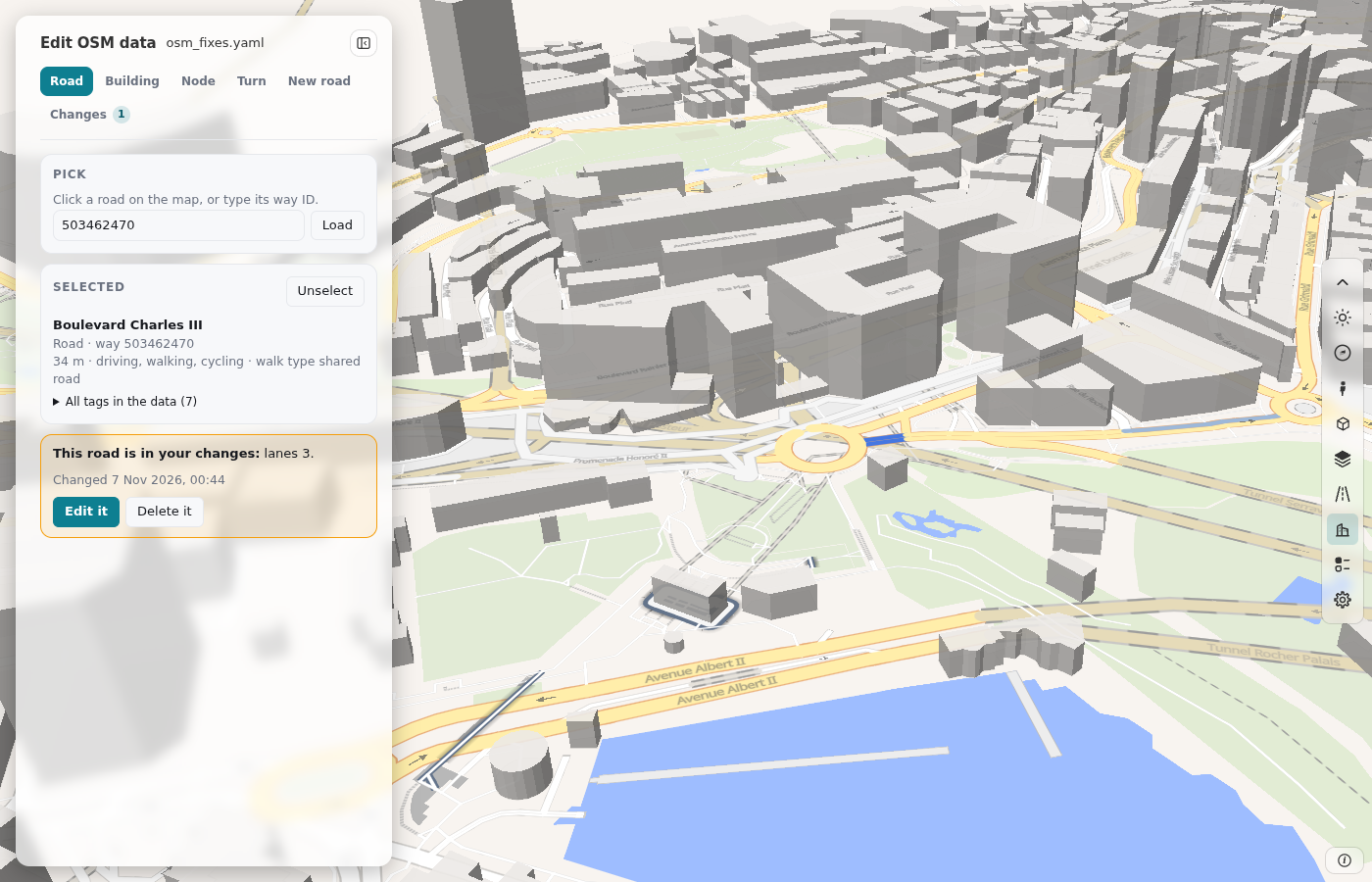
This road is in your changes: lanes 2, name "B". Edit it Delete it
- Edit it opens the form with the values of your changes.
- Delete it removes the changes of the object, and the form opens with the OSM data. Undo in the Changes tab brings them back.
The box shows for a road, a building (with its walls), a node, the turn rules of a road at a junction, and a new road that you open from the Changes tab.
A file that you load can have two or more rules for one object. Then the box says how many. Edit it joins them into one rule: for the same key, the later rule wins, as in the build. The build result does not change. The Changes tab marks such an object with "2 rules".
Edit on your computer: duckosm edit
duckosm edit opens the same panel on a page on your computer, for a database that you built. You do not build the area again in the
browser, and you do not download the file: the page saves each change in the fixes file at once.
- Build the area with
duckosm build(for exampleduckosm build --config my_area.yaml). The database keeps the record of its build: the config and the folder of the build. -
Start the page:
duckosm edit data/db/my_area.duckdbThe command writes the address of the page,
http://127.0.0.1:8790/. Open it in your browser. The page answers only on this computer. To use another port, add--port 8791. When you connect to the computer with ssh, forward the port (ssh -L 8790:127.0.0.1:8790 ...). -
The page is roadstyle's dashboard of the database, with Edit OSM data in its panel. Make the changes as on the duckOSM Studio page: pick an object, change the fields, and click Add to changes.
- Each change goes into
osm_fixes.yamlbeside the database at once. To use another file, start with--fixes path/to/file.yaml. If the file does not exist, the page starts with no rules, and your first change makes the file. Download in the Changes tab gives a copy. - Click Build again in the Changes tab. The build of the database runs again with the fixes file, and the page loads again with the new network.
- Press Ctrl+C in the terminal to stop the page.
The page
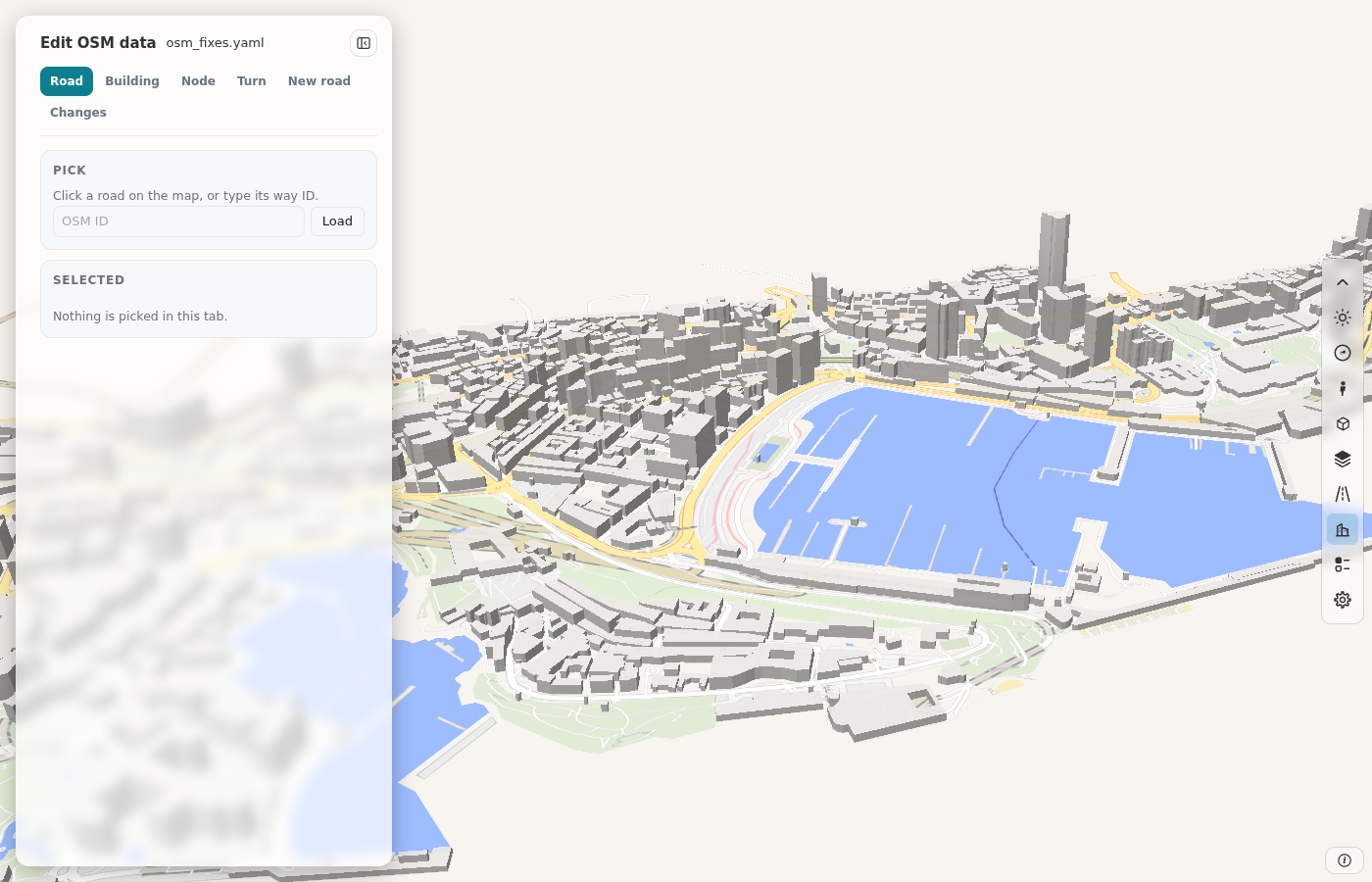
| Part | What it is |
|---|---|
| The panel at the left | Edit OSM data with the name of the fixes file and Hide panel at the top. Under them, six tabs: Road, Building, Node, Turn, New road and Changes. A tab with edits that are not added has an amber dot, and Changes shows the number of changes. |
| The map | The roads of the database, drawn by roadstyle. Click a road, a building or a node to pick it. The hover is on the objects of the tab: the roads in the Road and Turn tabs, the buildings in the Building tab, and nothing in the other tabs. |
| The bar at the right of the map | The map tools of roadstyle's dashboard: the light or dark theme, zoom, Street View, Google 3D, the base map and the layers, and the settings. |
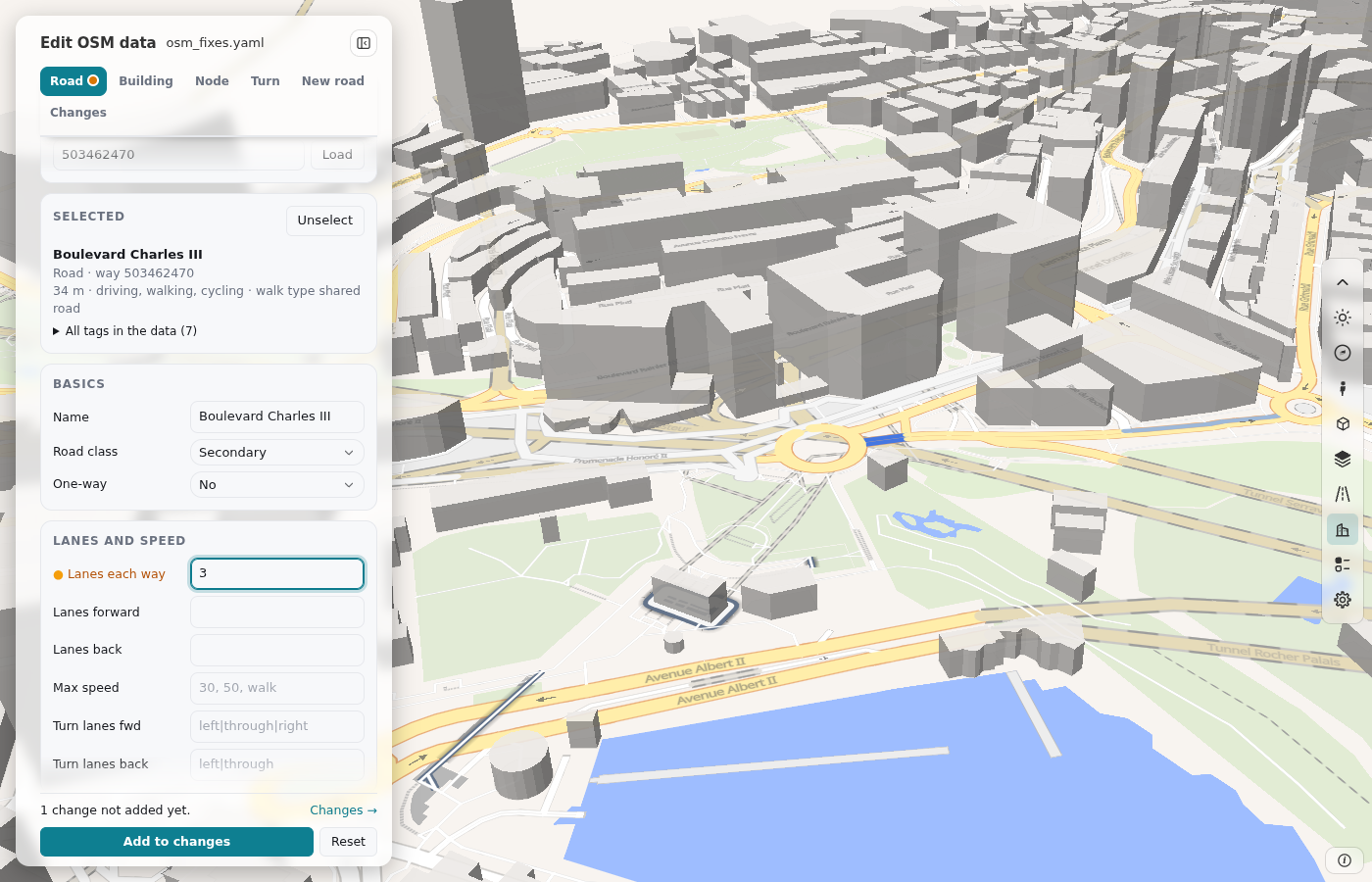
To change a road, click it on the map. The form shows its tags. Change a field, for example the lanes, and click Add to changes:
When you pick the road again, the box "This road is in your changes" shows over the form (An object that is in your changes):
The Changes tab lists your rules. Build again builds the database with them, and the page loads the new network:
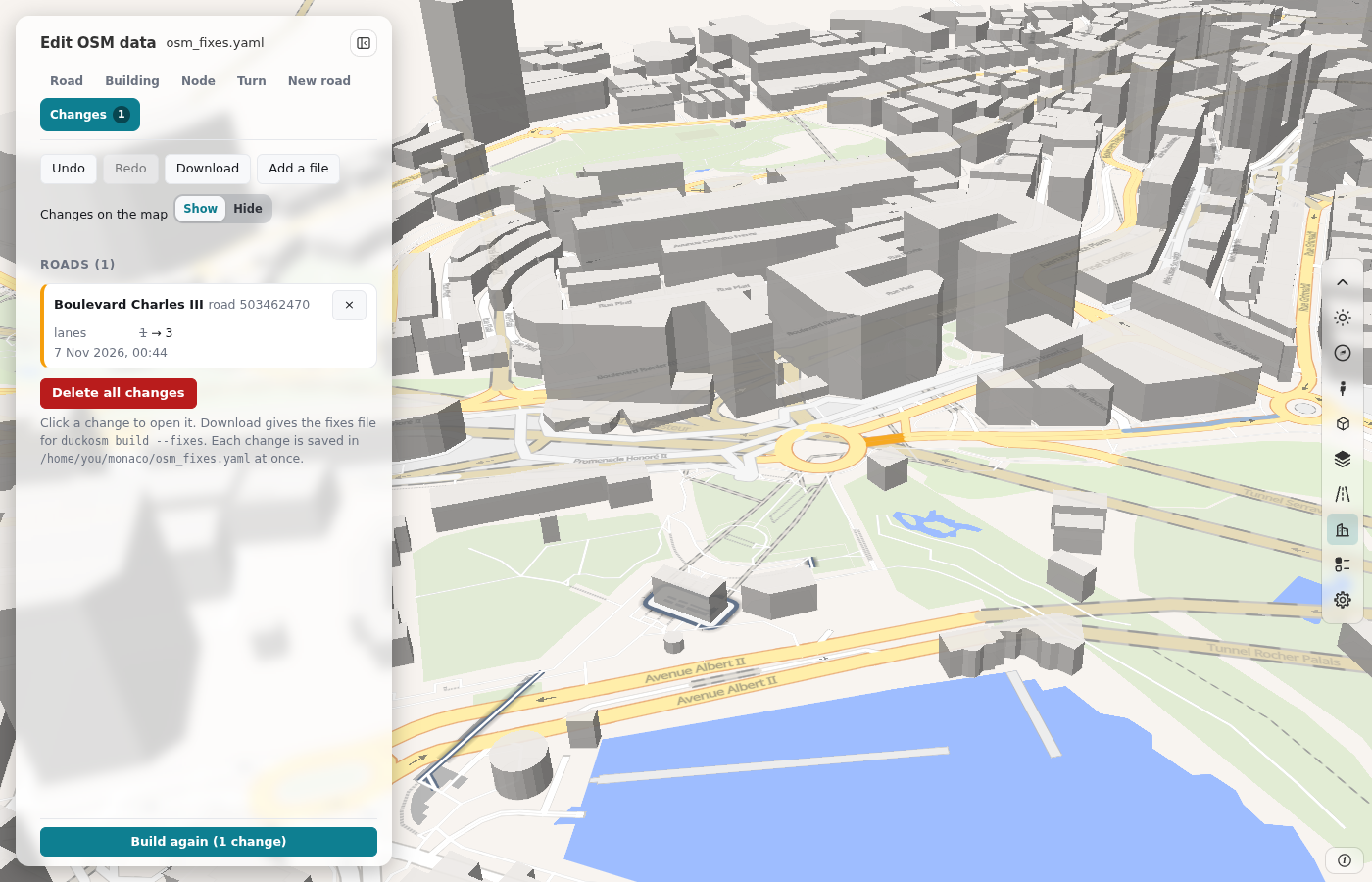
Changes on the map, Show or Hide, shows or hides your changes on the map (the amber objects, the 3D buildings and the amber walls). The changes stay in the file. Delete all changes deletes every change from the list and from the fixes file. It asks first. Undo brings the changes back while the page is open. After a reload, they are gone.
The time of each change
Each record that the editor writes has the key changed: your local date and time, with the offset from UTC.
overrides:
  - osm_id: 503462470
    lanes: 3
    changed: '2026-11-06T14:32:05+01:00'
- The editor sets the time of now on each record that you add or change. A record that you do not change keeps its time.
- When the page opens a file, each record with no
changed(an old file, or a file that you wrote by hand) gets the time of now, and the page saves the file. - The Changes tab shows the time under each change, for example "6 Nov 2026, 14:32", in the time zone of your browser. The box "This road is in your changes" shows it too.
- The build does not read
changed.
Add a file
Add a file in the Changes tab adds the changes of another fixes file to your changes. Select the file (.yaml or .yml) in the
dialog of your browser.
- If the file is not valid, the page shows the error and changes nothing.
- A record of the file with no
changedgets the time of now. - If an object is in the two files, the change with the later time stays, and the other goes. The rule of a road and its tag edit count as one object.
- If the two changes of an object have the same time, the two stay, the added one last. The build applies them in file order, so the added change wins key by key. The Changes tab shows "2 rules" on the object.
- If a new road of the file has the ID of one of your new roads, and other points, it is another road. It gets the next free ID, and the turn rules of the file that use it get the new ID too.
- A status line tells the result. Undo takes back all of the file in one step. The page saves the result in the fixes file at once.
Before the page writes a file that was there already, it keeps the old file as osm_fixes.yaml.bak. The page writes the file from the
rules of the panel, so the comments of a file that you wrote by hand do not stay. If the file is not valid YAML, the page tells you and
does not change it.
Build again is off when the database has no record of its build: a database from an older duckOSM, from duckOSM Studio, or from
duckosm-rust without --config. The reason shows under the button. Build the database again with duckosm build, then it works.
duckosm-rust edit my_area.duckdb opens the same page from duckOSM's Rust program. Its Build again runs the build of the Rust program
(duckosm-rust --config). It writes the .duckdb file only, and it skips the steps that the Rust program does not have.
Build with the file
Give the file to duckosm build:
duckosm build --pbf monaco-latest.osm.pbf -b monaco.geojson --fixes osm_fixes.yaml
A wall rule (extra.building_faces) needs the table main.building_faces. Set options.building_faces in the
config file:
osm_overrides: osm_fixes.yaml   # or --fixes on the command line
options:
  building_faces: true
| Key | Rust engine (the default) | --engine python |
|---|---|---|
overrides, new_ways, turn_restrictions |
yes | yes |
extra.tag_edits |
yes | yes |
extra.building_faces |
with options.building_faces: true |
no: the build writes a warning and makes no walls |
On the Monaco sample, a file with every key gives the same rows as the page in all tables that the two have. The test
tests/test_page_fixes.py makes sure of this on each change of duckOSM.
If the file has wall rules and options.building_faces is off, the build writes a warning: the wall rules do nothing in that build.
What each change writes
This section shows, for each change that you make in the editor, the record that the editor writes in the fixes file, and the result
in the tables after duckosm build. The complete file that the editor wrote for these changes on the Monaco sample is
tests/data/editor_changes/osm_fixes.yaml. The test tests/test_editor_changes.py builds Monaco with it in the two engines and checks each result
below.
The editor writes two kinds of record for an object:
overrides(byosm_id): the keys that act on the network of each mode: Lanes each way (lanes), Lanes forward and back, One-way yes or no, Layer, the turn lanes, and Delete (remove).extra.tag_edits: the OSM tags, withsetanddelete.waskeeps the value before the first change; the build does not read it.
Each record also has changed, the time of the change (The time of each change). The examples below leave it out.
Road tab
overrides:
  - osm_id: 503462470
    lanes: 3
    turn_lanes_forward: left|through|through
  - osm_id: 766768153
    layer: 1
  - osm_id: 4229577
    remove: true
extra:
  tag_edits:
    - type: way
      id: 503462470
      set: {name: Boulevard Test, maxspeed: '30', sidewalk: both, surface: paving_stones}
    - {type: way, id: 157719645, set: {highway: service}}
    - {type: way, id: 4230099, set: {motor_vehicle: 'no'}}
    - {type: way, id: 4230011, set: {foot: 'no'}}
    - {type: way, id: 165636031, set: {oneway: '-1'}}
    - {type: way, id: 766768153, set: {bridge: 'yes'}}
| Change in the form | Record | Result after the build |
|---|---|---|
| Lanes each way 3 | overrides: lanes: 3 |
driving.edges.lanes is 3 in each direction (before: 1) |
| Turn lanes fwd | overrides: turn_lanes_forward |
driving.lane_profile.turn of the forward edges: left, through, through. raw.ways has the tag turn:lanes:forward |
| Name | tag edit name |
name of the edges of all modes |
| Max speed 30 | tag edit maxspeed |
driving.edges.maxspeed_kmh is 30 (before: 60, the default of the class), and the travel times change |
| Sidewalk both | tag edit sidewalk |
walking.edges.walk_type is sidewalk (before: shared_road) |
| Surface | tag edit surface |
surface of the edges |
| Road class | tag edit highway |
highway of the edges (residential to service): the speed, the cost and the networks follow the new class |
| Cars No | tag edit motor_vehicle: 'no' |
the road is not in driving.edges (before: 18 edges); it stays in walking and cycling |
| Walking No | tag edit foot: 'no' |
the road is not in walking.edges (before: 14 edges); it stays in driving |
| Bikes No | tag edit bicycle: 'no' |
the road is not in cycling.edges |
| One-way, Yes reverse | tag edit oneway: '-1' |
one direction only, against the drawing of the way: 6 driving edges (before: 12) |
| One-way, Yes or No | overrides: oneway: true or false |
one or two directions |
| Layer 1, Bridge yes | overrides: layer: 1, tag edit bridge |
layer and bridge of the edges |
| Delete this road | overrides: remove: true |
the road is in no network and no layer (before: 12 edges) |
Building tab
overrides:
  - osm_id: 1152567278
    remove: true
extra:
  tag_edits:
    - type: way
      id: 23715051
      set: {building:levels: '9', height: '30', roof:shape: flat, building:colour: '#ffffff'}
    - {type: relation, id: 393226, delete: [building]}
  building_faces:
    - {building: 23715051, from_node: 256791677, to_node: 256791676, type: front, door: main}
| Change in the form | Record | Result after the build |
|---|---|---|
| Floors, height, roof, facade | tag edit | features.buildings.tags has the new values (before: building:levels 2) |
| Wall type and its door | extra.building_faces |
main.building_faces: face_type is front, edited is true and door is main (before: side, no door). Needs options.building_faces |
| Delete this building (a way) | overrides: remove: true |
the building is not in features.buildings |
| Delete this building (a relation) | tag edit: delete building |
the relation is not in features.buildings |
| Kind of a door | tag edit of the door node: entrance |
main.building_entrances: duckosm build makes it with options.building_faces, as Studio does |
Node tab
extra:
  tag_edits:
    - {type: node, id: 21912089, set: {highway: traffic_signals}}
    - {type: node, id: 13135657937, delete: [highway]}
    - {type: node, id: 21912099, set: {highway: crossing, crossing: marked, kerb: lowered}}
| Change in the form | Record | Result after the build |
|---|---|---|
| Kind Traffic signals on a junction | tag edit highway |
a new row in features.traffic with kind traffic_signals |
| Delete this traffic signal | tag edit: delete highway |
the node is not in features.traffic |
| Kind Crossing, with crossing and kerb | tag edit | a new row in features.traffic with kind crossing and the tags |
Turn tab
turn_restrictions:
  - {from_way: 4097656, via_node: 21912099, to_way: 157719652, restriction: only_right_turn}
  - {from_way: 4097656, via_node: 21912089, to_way: 35092475, restriction: no_straight_on}
| Change in the form | Record | Result after the build |
|---|---|---|
| A rule for a road that leaves the junction | turn_restrictions |
a row in driving.turn_restrictions (restriction_type, from_edge_id, via_node, to_edge_id); routing on driving.edge_graph obeys it |
After you pick a road, each of its junctions is a white dot on the map. The start of a one-way road is a junction too, with a gray ring: no turn from the road is there, and the panel says so. The Junction box lists the same junctions. Click a dot to choose that junction, or choose it in the box. The blue ring shows the chosen one.
On the map, the roads at the junction have the colors of the legend: the From road is blue, the roads that leave the junction are green, and the roads that only arrive (a one-way road into the junction) are violet. The colors on the map are the same as in the legend and the list, in the light and in the dark theme. A road of another network that meets the junction and is not in the driving network (a footway, a path) is named under the list. It is not on the map of this tab.
New road tab
new_ways:
  - id: 9000000000000
    nodes: [21911886, [7.4235072, 43.7371133], 21914340]
    tags: {highway: service, name: New lane}
| Change in the form | Record | Result after the build |
|---|---|---|
| Points, Road class, Name, … | new_ways: a node ID for a point on a junction, [lon, lat] for a free point |
2 edges in driving.edges with osm_id 9000000000000, and in the other modes that the class allows |
The keys under extra
extra.tag_edits
Each rule sets and deletes tags of one OSM way, node or relation. The build sets the tags first, then deletes the keys.
extra:
  tag_edits:
    - {type: way, id: 503462470, set: {sidewalk: both, surface: paved}}
    - {type: node, id: 21912089, set: {highway: traffic_signals}}
    - {type: relation, id: 393226, delete: [building]}
| Field | Does |
|---|---|
type |
way, node or relation (required) |
id |
the OSM id (required) |
set |
these tags get these values |
delete |
these tags go |
was |
the values before the change (the page writes them for its list of changes; the build does not read them) |
note |
free text |
changed |
the date and the time of the change, which the editor writes; the build does not read it |
The build changes the tags in raw.* before all other steps. So the networks, the layers (features.*), the bus routes and the
lane profile see the new tags. A rule on a relation changes its tags only, not its geometry. A rule for an object that is not in the area
does nothing.
extra.building_faces
Each rule gives one wall of a building another type, or a door.
extra:
  building_faces:
    - {building: 23715051, from_node: 256791670, to_node: 256791677, type: back}
| Field | Does |
|---|---|
building |
the OSM id of the building way or relation (required) |
from_node, to_node |
the two OSM nodes at the ends of the wall, in either order (required) |
type |
front, back, side, party or court |
door |
the kind of door of the wall, for example main or service (optional) |
note |
free text |
changed |
the date and the time of the change, which the editor writes; the build does not read it |
In main.building_faces, face_type has the type of the rule, computed_type has the type
that the build found, and edited is true.